Thursday, 31 October 2024

Read only field , get latest value from read only field in in power app portal


Below line is used to make field readonly in power app portal through js

$("#bdo_relationshiprole_name").parent().css("pointer-events","none"); 


Below line is used to set deault value in lookup field

$("#bdo_relationshiprole_name").attr("value",rolename);

$("#bdo_relationshiprole").attr("value",roleid);
$("#bdo_relationshiprole_entityname").attr("value","bdo_relationshiprole");

Below line is used to to used to get readonly value from field otherwise on form submit the read only values not getting
$("#bdo_relationshiprole").trigger('change');

Wednesday, 3 July 2024

Pass multiple Parameter to SSRS report from html webresource dynamic crm

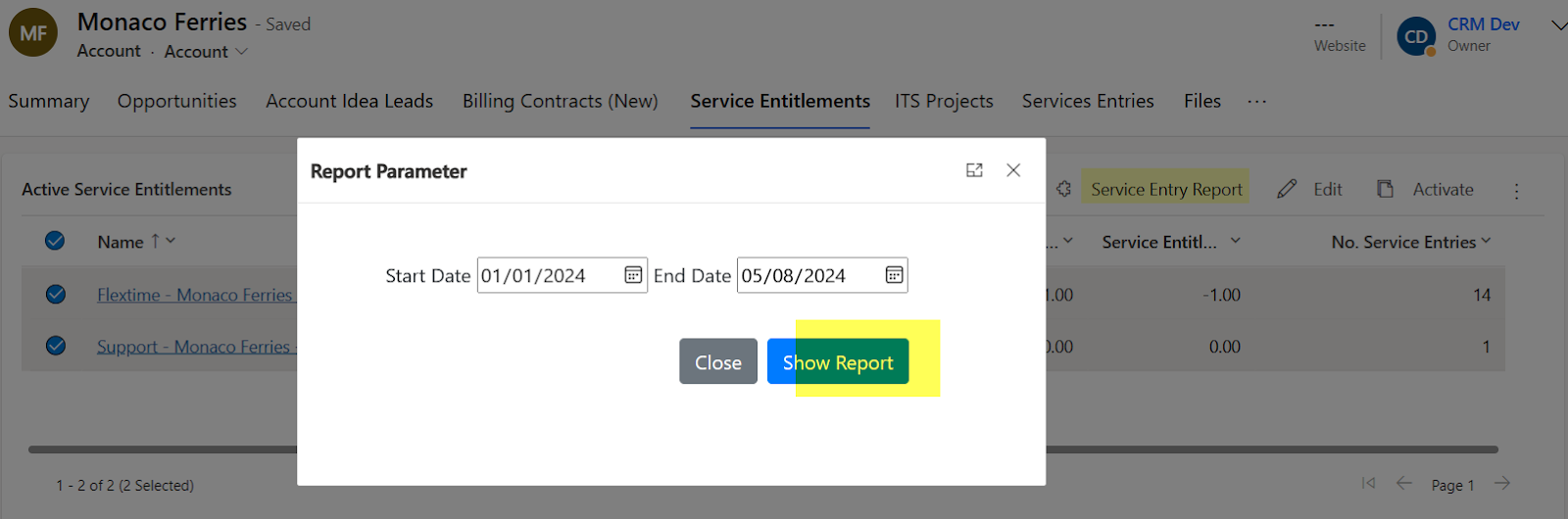
Open Webresource dialog from ribbon button in dynamic crm
function OpenReport(formContext, selectedRecordIds) {

    debugger;

    var accountId = formContext.data.entity.getId()

    accountId = accountId.replace("{", "").replace("}", "");

    openNodal1(accountId,selectedRecordIds);

}

function openNodal1(accountId, selectedRecordIds) {

    debugger;

    var arrStr = encodeURIComponent(JSON.stringify(selectedRecordIds));

    var dialogParameters = {

        pageType: "webresource", // required

        webresourceName: "ins_FilterServiceEntryReportPop", // Html Webresource that will be shown

        data: "ServiceEntitlement=" + arrStr+"&Customer="+accountId

    };

    var navigationOptions = {

        target: 2, // use 1 if you want to open page inline or 2 to open it as dialog

        height: { value: 40, unit: "%" },

        width: { value: 40, unit: "%" },

        title:"Report Parameter",

        position: 1 // 1 to locate dialog in center and 2 to locate it on the side,

    };

    Xrm.Navigation.navigateTo(dialogParameters, navigationOptions).then(

        function (returnValue) {

            alert("test");

        },

        function (e) {

            alert(e);

        }

    );

}


 Html code of dialog

<!DOCTYPE html>


<html>

<head>

    <meta charset="utf-8" />

    <title></title>

    <script type="text/javascript" src="ClientGlobalContext.js.aspx"></script>

    <script src="https://ajax.googleapis.com/ajax/libs/jquery/3.2.1/jquery.min.js"></script>

    <link rel="stylesheet" href="https://stackpath.bootstrapcdn.com/bootstrap/4.3.1/css/bootstrap.min.css" integrity="sha384-ggOyR0iXCbMQv3Xipma34MD+dH/1fQ784/j6cY/iJTQUOhcWr7x9JvoRxT2MZw1T" crossorigin="anonymous">

    <script src="https://code.jquery.com/jquery-3.3.1.slim.min.js" integrity="sha384-q8i/X+965DzO0rT7abK41JStQIAqVgRVzpbzo5smXKp4YfRvH+8abtTE1Pi6jizo" crossorigin="anonymous"></script>

    <script src="https://cdnjs.cloudflare.com/ajax/libs/popper.js/1.14.7/umd/popper.min.js" integrity="sha384-UO2eT0CpHqdSJQ6hJty5KVphtPhzWj9WO1clHTMGa3JDZwrnQq4sF86dIHNDz0W1" crossorigin="anonymous"></script>

    <script src="https://stackpath.bootstrapcdn.com/bootstrap/4.3.1/js/bootstrap.min.js" integrity="sha384-JjSmVgyd0p3pXB1rRibZUAYoIIy6OrQ6VrjIEaFf/nJGzIxFDsf4x0xIM+B07jRM" crossorigin="anonymous"></script>

    <style itype='text/css'>


    </style>

    <script type="text/javascript">

        var accountId;

        var ServiceEntitlementIds;

        var StartDate;

        var EndDate;

        $(document).ready(function () {

            debugger;

            //  var urlParams = getUrlParameters();

            // ServiceEntitlementIds = urlParams.data.split("&")[0].split("=")[1];

            // accountId = urlParams.data.split("&")[1].split("=")[1];

            //loadRecords(recordId);

        });

        function getUrlParameters() {

            debugger;

            var queryString = location.search.substring(1);

            var params = {};

            var queryStringParts = queryString.split("&");

            for (var i = 0; i < queryStringParts.length; i++) {

                var pieces = queryStringParts[i].split("=");

                params[pieces[0].toLowerCase()] = pieces.length === 1 ? null : decodeURIComponent(pieces[1]);

            }


            return params;

        }

        function SubmitButtonClick() {

            debugger;


            StartDate = $("#ServiceEntryStartDate").val();

            EndDate = $("#ServiceEntryEndDate").val();


            var urlParams = getUrlParameters();

            ServiceEntitlementIds = urlParams.data.split("&")[0].split("=")[1];

            ServiceEntitlementIds = decodeURIComponent(ServiceEntitlementIds);

            ServiceEntitlementIds = JSON.parse(ServiceEntitlementIds);

            accountId = urlParams.data.split("&")[1].split("=")[1];


            var selectedIds;

            for (var i = 0; i < ServiceEntitlementIds.length; i++) {

                if (i == 0)

                    selectedIds = ServiceEntitlementIds[i];

                else

                    selectedIds = selectedIds + "," + ServiceEntitlementIds[i];

            }

            var rdlName;

            var reportGuid;


            rdlName = "ServiceEntriesRelatedToCustomerServiceEntitlement.rdl";


            reportGuid = "CCC3EBA0-1832-EF11-8409-002248088D09";


var reporturl = "https://imagetechdev2.crm.dynamics.com" + "/crmreports/viewer/viewer.aspx?action=run";

reporturl += "&helpID=" + rdlName + "&id={" + reportGuid + "}&p:Customer=" + accountId + "&p:ServiceEntitlement=" + selectedIds + "&p:ServiceEntryStartDate=" + StartDate + "&p:ServiceEntryEndDate=" + EndDate;


            var newtab = window.open();


            newtab.location = reporturl;

            window.close();

        }

        function CancelButtonClick() {

            window.close();

        }

    </script>

</head>

<body>

    <div  id="exampleModal"  tabindex="-1" role="dialog" aria-labelledby="exampleModalLabel">

        <div class="modal-dialog" role="document">

            <div class="modal-content" style="border:none">

                <!--<div class="modal-header">

                    <h5 class="modal-title" id="exampleModalLabel">Filter Report</h5>

                </div>-->

                <div class="modal-body">

                    <label>Start Date</label>

                    <input type="date" id="ServiceEntryStartDate" placeholder="Type Start Date" />

                    <label>End Date</label>

                    <input type="date" id="ServiceEntryEndDate" placeholder="Type End Date" />

                </div>

                <div class="modal-footer" style="margin-right:8%;border-top:none;border-radius:unset">

                    <button type="button" onclick="CancelButtonClick()" class="btn btn-secondary" data-dismiss="modal">Close</button>

                    <button type="button" onclick="SubmitButtonClick()" class="btn btn-primary">Show Report</button>

                </div>

            </div>

        </div>

    </div>

</body>

</html>


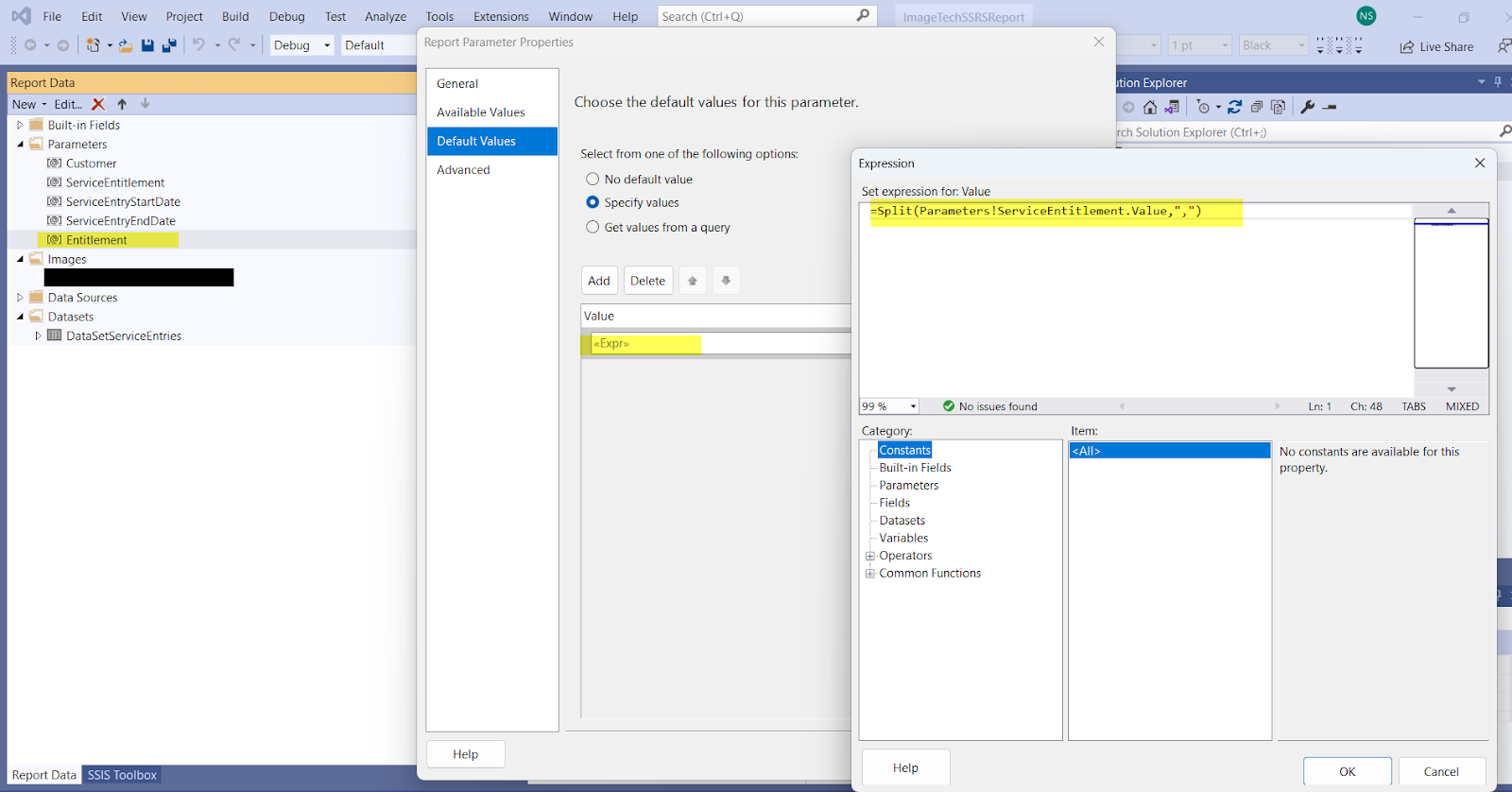
To Pass multiple values parameter to ssrs report create two paramters in SSRS Report

The first Parameter is of type text and pass values from js code as mentioned in the above code


Create Second Parameter in SSRS Report as of multi values

and use the first like this


use the second parameter in the fetch xml query


Download file from sharepoint in power app portal or power pages throuhg link


if you need to download file from sharepoint through link in power pages or power app portal prepare your link this


<a href="/_entity/sharepointdocumentlocation/bc2c41a8-0b4d-ee11-be6f-000d3a09d4be/3901d92f-17d3-ed11-a7c7-000d3a09d814?file=LepordCourierLaptop.pdf" target="_blank">


sharepointdocumentlocation id =  bc2c41a8-0b4d-ee11-be6f-000d3a09d4be

you can get sharepointdocumentid for record in crm from here


Tenenat id = 3901d92f-17d3-ed11-a7c7-000d3a09d814

you can get your tenenat id from azure portal


Friday, 7 June 2024

Set Lookup through expression conditionally in power automate flow

use the following expression to set lookup, change the systemusers entity with your entity plural name

    if(empty(variables('Owner ID')),
    '',
    concat(
        'systemusers(',
        variables('Owner ID'),
        ')'
    )
)

Tuesday, 28 February 2023

Numbering Table Parent group and child group ssrs report

 Recently I have faced a scenario to numbering parent group and subgroup in the following formate


10 parentGroupRow1

   10.1 childGroupRow1

   10.2 childGroupRow2

   10.2 childGroupRow2

20 parentGroupRow2

   20.1 childGroupRow1

   20.2 childGroupRow2

   20.2 childGroupRow2


So i create two dataset and use RunningValue function

= RunningValue(Fields!InvoiceDetail_invoicedetailid.Value,CountDistinct, "Invoice")*10 & "."& RunningValue(Fields!InvoiceDetailTask_activityid.Value,CountDistinct, "InvoiceDetail")


Friday, 14 January 2022

In subject lookup, some subject items are not showing Dynamic 365 CRM

 I faced a scenario where some subject items are not showing in subject lookup.

We are using Subject lookup on the Case form and creating cases for different subjects.

We have added a new subject in the subject entity but it's not showing in the subject lookup.


The issue is coming because there is an OOB field in the subject entity with a name featuremask and its value is null.


So I have updated its value to 1 then it's showing. by the following query.

update subject set featuremask = 1 where subjectid = "Provide your subject id here"


Friday, 7 January 2022

filter subgrid lookup view dynamically in Unified Interface Dynamic 365

I faced a scenario where the client want to filter subgrid lookup view dynamically


We have two custom entities with the name Case filling and Application Party, both entities have a lookup of Case entity.

Case Filling entitiy has one to many relationship with the Application Party entity.

On Case filling entity subgrid of Application added.

the client wants to show only those records in subgrid add existing lookup view which is related to the case entity which is set on case filling.


To achieve the above goal I customized the command of Add existing button of Appliation entity.

and bind a js webresource.


When clicking on add existing button a lookup view dialog is opened, the client want to show only those record which is related to the case entity.


I used the below Js code and filter records dynamically by taking help from this link.

function filterApplicationLookupView(formContext) {

    debugger;

    var caseid = null;

    var searchText = "";

    //var formContext = executionContext.getFormContext();

    if (formContext.getAttribute("ms_case") != null && formContext.getAttribute("ms_case").getValue() != null)

        caseid = formContext.getAttribute("ms_case").getValue()[0].id;


    caseid = caseid.replace("{", "").replace("}", "");


    if (caseid != null) {

        var lookupOptions = {

            defaultEntityType: "ms_applicationparty",

            entityTypes: ["ms_applicationparty"],

            defaultViewId: "B538E004-8EE7-4B33-B51F-2F97A62C940A",

            viewIds: ["B538E004-8EE7-4B33-B51F-2F97A62C940A"],

            allowMultiSelect: true,

            disableMru: true,

            filters: [{ filterXml: "<filter type='and'><condition attribute='ms_case' operator='eq' value='" + caseid + "' /><condition attribute='ms_casefiling' operator='null' /></filter>", entityLogicalName: "ms_applicationparty" }],

            searchText: ''

        };

        Xrm.Utility.lookupObjects(lookupOptions)

            .then(

                function (result) {

                    if (result == null || result.length == 0) {


                    } else {

                        var appParties = [];

                        for (var i = 0; i < result.length; i++) {

                            appParties.push(result[i].id)

                        }

                        for (var i = 0; i < appParties.length; i++) {

                            var appPartyId = appParties[i];

                            appPartyId = appPartyId.replace("{", "").replace("}", "");

                            UpdateCaseFillingOnApplication(appPartyId);

                        }

                    }

                });

    }

}

function UpdateCaseFillingOnApplication(appPartyId) {

    debugger;

    var serverURL = Xrm.Page.context.getClientUrl();

    var fillingId = Xrm.Page.data.entity.getId();

    fillingId = fillingId.replace("{", "").replace("}", "");

    var filling = {};


    //Lookup

    filling["ms_CaseFiling@odata.bind"] = "/ms_casefilings(" + fillingId + ")";  //setting existing lookup


    var req = new XMLHttpRequest();

    req.open("PATCH", serverURL + "/api/data/v9.0/ms_applicationparties(" + appPartyId + ")", false);

    req.setRequestHeader("Accept", "application/json");

    req.setRequestHeader("Content-Type", "application/json; charset=utf-8");

    req.setRequestHeader("OData-MaxVersion", "4.0");

    req.setRequestHeader("OData-Version", "4.0");

    req.send(JSON.stringify(filling));


    if (req.readyState == 4 /* complete */) {

        if (req.status == 204) {


        } else {


        }

    }

}


Wednesday, 29 December 2021

Using Javascript Check which entity a new record was created from Dynamic 365 model driven app

 In Dynamic 365 model-driven app if you need to check in javascript from where the entity record is created

use the below line of code

Xrm.Utility.getGlobalContext().getQueryStringParameters()

Tuesday, 9 March 2021

Show Notification on Home Page Grid Dynamic 365

  var notification =

    {

    type: 2,

    level: 4, // information. 1. success, 2. error, 3. warning

    message: "Doc is being generating for the selected records."

    };

    Xrm.App.addGlobalNotification(notification)

Monday, 28 September 2020

Monday, 13 January 2020

Call Azure function from Javascript

 <script type="text/javascript">
        function CallAzurefunction() {
            debugger;
            var data = {
                'name': 'testazure function'
            };

            var req = new XMLHttpRequest();
            req.open("POST", "AzureFunctionUrl&name=test", true);
            req.setRequestHeader("Accept", "application/json");
            req.setRequestHeader("Content-Type", "application/json; charset=utf-8");
            req.setRequestHeader("crossDomain", true);
            req.onreadystatechange = function () {
                if (req.readyState == 4 /* complete */) {
                    req.onreadystatechange = null;
                    if (req.status == 200) {

                        // alert("Project created");
                    } else {

                        //alert(error.message);
                    }
                }
            };
            //req.send(JSON.stringify(data));

            req.send();

        }
    </script>

Call Azure function from C# code


 string azureFunctionUrl = "";
            var content = new StringContent(jsonObjectString, Encoding.UTF8, "application/json");
            using (HttpClient client = new HttpClient())
            {
                client.DefaultRequestHeaders.Add("x-functions-key", "y3cQDQDJaPuZ6BH8G2aS4XoKo1c0ik0KjirVwU4REHvSBcFqWVTQrg==");
                client.DefaultRequestHeaders.Add("Accept", "application/json");
                //client.DefaultRequestHeaders.Add("Content-Type", "application/json; charset=utf-8");
                using (HttpResponseMessage response = client.PostAsync(azureFunctionUrl, content).Result)
                using (HttpContent respContent = response.Content)
                {
                    // ... Read the response as a string.
                    var tr = respContent.ReadAsStringAsync().Result;
                    // ... deserialize the response, we know it has a 'result' field
                    //dynamic azureResponse = JsonConvert.DeserializeObject(tr);
                    //// ... read the data we want
                    //result = azureResponse.result;
                }
            }

Fetch Xml,Group by Date field and then sort by same Date field


Get Latest records by ab_effectivedate field and aggregate EarnCode decimal field.

<fetch version='1.0' output-format='xml-platform' mapping='logical' distinct='false' aggregate='true'> <entity name='ab_deductionfringes'>
<attribute name='ab_effectivedate' alias='EffectiveDateYear' groupby='true' dategrouping='year'/>
<attribute name='ab_effectivedate' alias='EffectiveDateMonth' groupby='true'dategrouping='month'/>
<attribute name='ab_effectivedate' alias='EffectiveDateDay' groupby='true' dategrouping='day'/>
<attribute name='ab_earncode' alias='EarnCode' aggregate='sum' />
<order alias='EffectiveDateYear' descending='true' />
<order alias='EffectiveDateMonth' descending='true' />
<order alias='EffectiveDateDay' descending='true' />
 <filter type='and'>
  <condition attribute='ab_union' operator='eq'  uitype='ab_union' value='" + unionId + @"' />
   <condition attribute='ab_trade' operator='eq'  uitype='ab_trade' value='" + tradeId + @"' />
   <condition attribute='statecode' operator='eq' value='0' />
   <condition attribute='ab_effectivedate' operator='not-null' />
 </filter>
 </entity>
</fetch>

Thursday, 14 November 2019

Dynamic 365, Create Associated view or other OOB view in C#

Sometimes the OOB view deleted mistakenly and it create problems.
The same scenario come with me, I have custom entity Bid and its associated view deleted mistakenly and we need to create one to many relationship with same Bid entity.
But the associated view of custom entity bid is deleted so we can't create relationship.

Through following code i created the associated view of Bid entity and then i create one to many relationship with same bid entity.

                // Create the view.
                System.String layoutXml =@"<grid name='resultset' object='3' jump='ab_name' select='1'
                                            preview='1' icon='1'>
                                            <row name='result' id='ab_bidid'>
                                            <cell name='ab_name' width='150' />
                                            </row>
                                        </grid>";

 System.String fetchXml = @"<fetch version='1.0' output-format='xml-platform' mapping='logical' distinct='false'>
                <entity name='ab_bid'>
                  <attribute name='ab_name' />
                  <attribute name='ab_bidid' />
                  <filter type='and'>
                    <condition attribute='statecode' operator='eq' value='0' />
                  </filter>
                  <order attribute='ab_name' descending='false' />
                </entity>
              </fetch>";


                Entity entity = new Entity("savedquery");
                entity["description"] = "Bid Associated View";
                entity["name"] = "Bid Associated View";
                entity["querytype"] = 2; // 2 is type code of Associated view
                entity["returnedtypecode"] = "ab_bid";  // enity name
                entity["fetchxml"] = fetchXml;
 
                entity["layoutxml"] = layoutXml;
               
                Guid _customViewId = service.Create(entity);

Friday, 9 August 2019

Add Custom View to lookup field and hide all other views in Dynamic 365 in javascript


Follow the below steps to add custom view to lookup field and hide all other views.

1)Go to lookup field on form, select the lookup field and click on change properties button.
Go to the additional properties and set view selector to off.


Step 2)  register this function with form onload event.


function formOnLoad(context) {
        debugger;
        try {
            var formContext = context.getFormContext();
           
            if (formContext.getControl("lookupfieldname") != null) {
                formContext.getControl("lookupfieldname").addPreSearch(function () {
                    filterServiceTypeLookup(context);
                });
            }
         
        } catch (ex) {

        }
    }


function to filter your lookup field record

    function  filterServiceTypeLookup(context) {
       
        try {
            var formContext = context.getFormContext();
            var opp = formContext.getAttribute("ab_opportunityid");
            if (opp != null) {
                var oppValue = opp.getValue();
                if (oppValue != null) {
                    var oppId = oppValue[0].id;
                    oppId = oppId.replace("{", "");
                    oppId = oppId.replace("}", "");
                   
 var fetchXML = "<fetch version='1.0' output-format='xml-platform' mapping='logical'    distinct='true' no-lock='true'>";
                    fetchXML += "<entity name='ab_servicetype'>";
                    fetchXML += "<attribute name='ab_servicetypeid' />";
                    fetchXML += "<attribute name='ab_name' />";
                    fetchXML += "<attribute name='createdon' />";
                    fetchXML += "<order attribute='ab_name' descending='false' />";
                    fetchXML += "<link-entity name='ab_ab_servicetype_opportunity' from='ab_servicetypeid' to='ab_servicetypeid' visible='false' intersect='true'>";
                    fetchXML += "<link-entity name='opportunity' from='opportunityid' to='opportunityid' alias='aa'>";
                    fetchXML += "<filter type='and'>";
                    fetchXML += "<condition attribute='opportunityid' operator='eq' value='" + oppId + "' />";
                    fetchXML += "</filter>";
                    fetchXML += "</link-entity>";
                    fetchXML += "</link-entity>";
                    fetchXML += "</entity>";
                    fetchXML += "</fetch>";

                    var layoutXML = "<grid name='' icon='1' select='1' jump='ab_name' object='10086' preview='1'>";
                    layoutXML += "<row id='ab_servicetypeid' name='ab_servicetype'>";
                    layoutXML += "<cell name='ab_name' width='200' imageproviderfunctionname='' imageproviderwebresource='$webresource:' />";
                    layoutXML += "<cell name='createdon' width='200' imageproviderfunctionname='' imageproviderwebresource='$webresource:' />";
                    layoutXML += "</row>";
                    layoutXML += "</grid>";

                    var viewId = "{AEFB3055-52B4-491C-B0CF-11AEFDF82825}"  // lookup view id

                    var entityName = "entityname";
                    var viewDisplayName = "Filtered View Name";

                    formContext.getControl("ab_servicetypeid").addCustomView(viewId, entityName, viewDisplayName, fetchXML, layoutXML, true);
                 
                }
            }
        } catch (ex) {

        }
    }


Step 3)
 view id is the lookup view id of the entity
 var viewId = "{AEFB3055-52B4-491C-B0CF-11AEFDF82825}" 

Wednesday, 31 July 2019

Show Hide Control on form in JavaScript on record status Changed dynamic 365

One of our client requirements to show custom entity grid on opportunity form when opportunity is closed as won otherwise hide the grid.
To achieve the requirement, I add the custom entity grid to section on form and register a custom JavaScript function with statuscode field.

JavaScript code of function

function showHidSubGridProjectSectionOnStatusChange ()
{
        var oppStatus = Xrm.Page. getAttribute("statuscode"). getValue();                   
        if (oppStatus == 3) {   //3 is for Won opportunity
            Xrm.Page.ui.tabs.get("Summary"). sections.get("section_subgridProjects"). setVisible(true);                
        } else {
            Xrm.Page.ui.tabs.get("Summary"). sections.get("section_subgridProjects"). setVisible(false);                             
        }
 }


To trigger the JavaScript function, click on close As won button and when click on Ok button the function will called.


I am showing the highlighted section when opportunity status become won otherwise I hide it.


This method works for any entity if you want to trigger JavaScript function on record status change.
Every entity in CRM has OOB field statuscode register JavaScript function with statuscode field.
When record status the JavaScript code will execute.

That’s it for today, I hope it helped you.

Change Display name of Managed Field in Dynamic 365


Sometime we need to change the Display name of Managed field in Dynamic 365.

The following code is used to change the Display name of Managed field.  

IOrganizationService orgService = (IOrganizationService)conn.OrganizationWebProxyClient != null ? (IOrganizationService)conn.OrganizationWebProxyClient : (IOrganizationService)conn.OrganizationServiceProxy;


RetrieveAttributeRequest attributeRequest = new RetrieveAttributeRequest

                {
                    EntityLogicalName = Opportunity.EntityLogicalName,

                    LogicalName = "parentaccountid",

                    RetrieveAsIfPublished = true

                };

                // Execute the request

                RetrieveAttributeResponse attributeResponse =

                   (RetrieveAttributeResponse)orgService.Execute(attributeRequest);

                Console.WriteLine("Retrieved the attribute {0}.",

                   attributeResponse.AttributeMetadata.SchemaName);

                // Modify the retrieved attribute

                AttributeMetadata retrievedAttributeMetadata =

                   attributeResponse.AttributeMetadata;

                retrievedAttributeMetadata.DisplayName =

                   new Label("Bidding To", 1033);

                // Update an attribute retrieved via RetrieveAttributeRequest


                UpdateAttributeRequest updateRequest = new UpdateAttributeRequest

                {

                    Attribute = retrievedAttributeMetadata,
                   

                    EntityName = Opportunity.EntityLogicalName,

                    MergeLabels = false
                   

                };

                // Execute the request

                orgService.Execute(updateRequest);

Wednesday, 22 May 2019

Retrieve Local Option set metadata in java script using webapi, Dynamic 365

   function GetOptionSetOptionValue(optionText, optionSetLogicalName)
{
        debugger;
        var req = new XMLHttpRequest();
        req.open("GET", Xrm.Page.context.getClientUrl() + "/api/data/v9.1/EntityDefinitions(LogicalName='ab_bid')/Attributes/Microsoft.Dynamics.CRM.PicklistAttributeMetadata?$select=LogicalName&$filter=LogicalName eq '" + optionSetLogicalName + "' &$expand=OptionSet", false);
        req.setRequestHeader("OData-MaxVersion", "4.0");
        req.setRequestHeader("OData-Version", "4.0");
        req.setRequestHeader("Accept", "application/json");
        req.setRequestHeader("Content-Type", "application/json; charset=utf-8");
        req.setRequestHeader("Prefer", "odata.include-annotations=\"*\"");
        req.send(null);
        if (req.readyState === 4) {
            req.onreadystatechange = null;
            if (req.status === 200) {
                var results = JSON.parse(req.response);
                debugger;
                for (var i = 0; i < results.value[0].OptionSet.Options.length; i++) {
                    debugger;
                    var Label = results.value[0].OptionSet.Options[i].Label.UserLocalizedLabel.Label;
                    if (Label.trim().toLowerCase() == optionText.trim().toLowerCase()) {
                        return results.value[0].OptionSet.Options[i].Value;
                    }
                    //alert(Label);
                }
            } else {
                Xrm.Utility.alertDialog(req.statusText);
            }
        }
    }

Read only field , get latest value from read only field in in power app portal

Below line is used to make field readonly in power app portal through js $( "#bdo_relationshiprole_name" ).parent().css( "po...